Mastering Anonymity: How to Install and Rotate Tor IP Every Minute in Kali Linux
Introduction to Tor and Anonymity
In the realm of cybersecurity and digital privacy, anonymity is a coveted asset. Whether you're a penetration tester, a security researcher, or simply someone who values their online privacy, masking your IP address is a fundamental step. The Onion Router (Tor) is a powerful, free, and open-source software that enables anonymous communication by bouncing your internet traffic through a free, worldwide, volunteer overlay network consisting of more than seven thousand relays to conceal a user's location and usage from anyone conducting network surveillance or traffic analysis. This blog post will guide you through the process of installing Tor on your Kali Linux system and, more importantly, how to automate the process of changing your Tor IP address every minute, significantly enhancing your anonymity.
Installing Tor on Kali Linux
The installation of Tor on Kali Linux is a straightforward process, leveraging the distribution's robust package management system. For most users, the standard Tor package available in the Kali repositories is sufficient. Open your terminal and execute the following commands:
sudo apt update
sudo apt install tor obfs4proxy
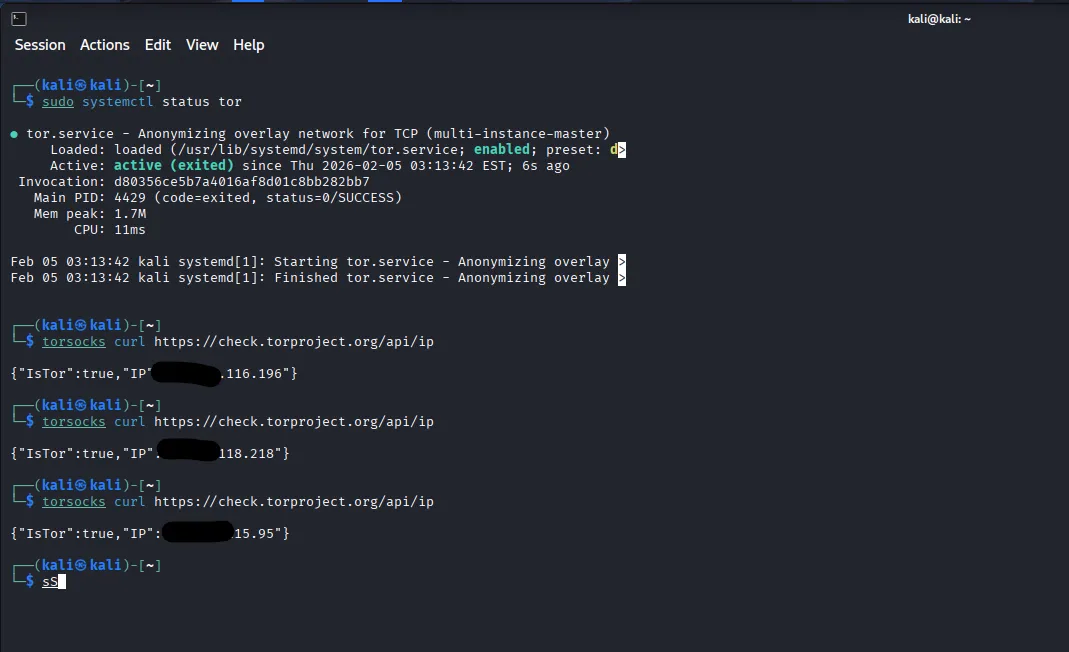
The first command, sudo apt update, refreshes your package lists, ensuring you get the latest available versions. The second command, sudo apt install tor obfs4proxy, installs the Tor daemon itself and obfs4proxy, which is a pluggable transport that can help circumvent censorship by obfuscating Tor traffic. Once installed, the Tor service should start automatically. You can verify its status with:
sudo systemctl status tor
If it's not running, you can start it using sudo systemctl start tor and enable it to start on boot with sudo systemctl enable tor.
Understanding Tor's Circuit and IP Rotation
Tor works by creating a circuit, which is a path through three random Tor relays (entry, middle, and exit). Each relay in the circuit knows only the IP address of the relay immediately before and after it. This layered approach ensures that no single relay knows both the origin and destination of the traffic. By default, Tor establishes a new circuit every 10 minutes to maintain anonymity. However, for more sensitive tasks or when rapid IP rotation is desired, we can configure Tor to change its circuit more frequently.
The Tor daemon maintains a configuration file, typically located at /etc/tor/torrc. This file allows for extensive customization of Tor's behavior. We will be modifying this file to adjust the circuit build timeout, which influences how often new circuits are established.
Automating IP Changes: Modifying torrc
To achieve an IP change every minute, we need to instruct the Tor daemon to build new circuits much more rapidly. This is accomplished by reducing the CircuitBuildTimeout value in the torrc file. A lower value means Tor will attempt to build a new circuit more aggressively if it encounters issues or simply after a shorter period.
Open the torrc file with a text editor with root privileges:
sudo nano /etc/tor/torrc
Scroll to the bottom of the file or find a section related to circuit timeouts. Add the following lines:
# Set the circuit build timeout to 60 seconds
CircuitBuildTimeout 60

# Allow for more circuit builds per minute
HookExecutePreBandwidthReport /usr/bin/killall -HUP tor

# Optional: Increase MaxTorCircuits if you experience issues with too many circuits
# MaxTorCircuits 100
Explanation:
CircuitBuildTimeout 60: This directive tells Tor to try and build a new circuit within 60 seconds. If it fails to build a circuit within this time, it will discard it and try again.HookExecutePreBandwidthReport /usr/bin/killall -HUP tor: This is a more aggressive approach. It tells Tor to send a HUP signal (which causes Tor to re-read its configuration and effectively rebuild circuits) just before it reports bandwidth usage. This can lead to very frequent circuit changes, potentially every minute or even faster depending on network conditions and Tor's internal timings.
After adding these lines, save the file (Ctrl+X, Y, Enter in nano) and restart the Tor service for the changes to take effect:
sudo systemctl restart tor
You can also use sudo systemctl reload tor to apply configuration changes without a full restart, but a restart is generally more reliable for such significant changes.
Verifying Your New IP Address
To confirm that your Tor IP address is indeed changing, you can use a simple script or an online service. A reliable method is to use a web service that displays your IP address and automate checking it periodically.
Create a simple shell script, for example, named check_ip.sh:
#!/bin/bash

while true; do
    echo "Current Tor IP: $(curl --socks5 127.0.0.1:9050 --socks5-user '' --socks5-passwd '' 'https://api.ipify.org')"
    sleep 60
done
Make the script executable:
chmod +x check_ip.sh
Now, run the script:
./check_ip.sh
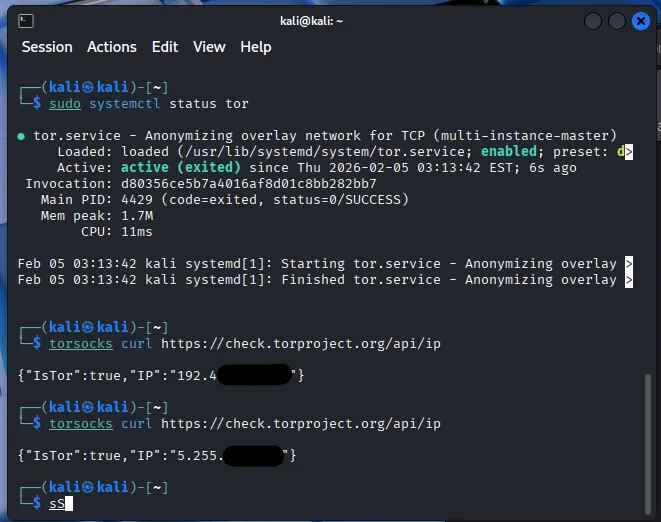
This script will periodically fetch your public IP address through the Tor proxy (running on 127.0.0.1:9050) and print it to the console, pausing for 60 seconds between checks. You should observe the IP address changing approximately every minute.
Important Considerations and Potential Downsides
While achieving a one-minute IP change offers a high degree of anonymity, it's crucial to be aware of the potential implications:
- Performance Degradation: Constantly building new circuits can consume more system resources and potentially slow down your internet connection.
- Increased Tor Network Load: Aggressively changing circuits puts a higher demand on the Tor network, which is operated by volunteers. Use this setting responsibly.
- Tor Exit Node Blocking: Some websites or services may block IP addresses from known Tor exit nodes, especially if they detect rapid IP changes. This can lead to being locked out of certain sites.
- Not Foolproof: While significantly enhancing anonymity, no system is entirely foolproof. Advanced adversaries might still find ways to de-anonymize users under certain circumstances.
For most use cases, the default Tor settings or a slightly reduced circuit timeout (e.g., 5 minutes) are often sufficient. Only implement the one-minute rotation if you have a specific, well-understood need for such rapid IP changes.
Conclusion
By following these steps, you can successfully install Tor on your Kali Linux system and configure it to rotate your IP address every minute. This advanced technique can bolster your anonymity for sensitive operations. Remember to weigh the benefits against the potential performance impacts and always use such tools responsibly and ethically. Happy anonymizing!
Frequently Asked Questions
Is this guide beginner friendly?
Yes. This tutorial is written step-by-step for beginners.
Does this work in 2026?
Yes. This article is updated regularly with latest changes.
Where can I learn more?
Browse more tutorials on LoopGuy.





Comments (0)
No comments yet. Be the first to comment!
Leave a Comment